docs.semactic › Semactic Features
How recommendations are generated
Every task in Semactic starts as a recommendation: a concrete suggestion to improve your SEO or GEO visibility. This page explains where recommendations come from, how they are categorised and prioritised, and how to generate new ones. For the day-to-day workflow (validate, assign, mark as done), see Tasks.
Where recommendations come from
Semactic builds recommendations from three sources:
- Technical crawl — your website is crawled regularly to detect issues: missing H1, duplicate titles, missing meta descriptions, broken links, slow pages, missing structured data, and more.
- Keyword and prompt tracking — keywords ranking below their potential, and prompts where your brand is missing from AI answers, lead to content recommendations.
- Competitive analysis — gaps between you and your tracked competitors (topics they cover and you don't, benefits AI associates with them) lead to New Content and GEO recommendations.
New recommendations arrive in the Pending column of the Tasks board. They are temporary: if you don't move them to another column, they disappear after 15 days.
[!NOTE] When a market has just been created, the Tasks page shows No recommendations yet until the first recommendations are set up. This takes about 5 minutes once started.
Categories
Each recommendation has a category, so you can filter and prioritise:
| Category | Typical recommendation |
|---|---|
| On Page | Improve the title, headings, internal links or keyword coverage of an existing page. |
| Technical | Fix a crawl issue: speed, indexability, structured data, canonical, hreflang… |
| GEO | Create or adjust content so that AI engines cite or mention your brand for a tracked prompt. |
| New Content | Publish a new page or article to cover a missing topic. |
| Backlinks | Get mentioned by an authoritative third-party website. |
| UX | Improve layout, readability or page experience. |
Admins choose which categories are generated automatically for each market, in Account → market → Manage auto generation (see Account).
Priorities
Recommendations have a High, Medium or Low priority, based on their estimated impact and effort. High-priority items, especially technical ones, have the biggest effect on your Website Health Score and your visibility: handle them first.
Generate recommendations yourself
On top of the automatic runs, you can generate recommendations from the Tasks page with Generate Tasks:
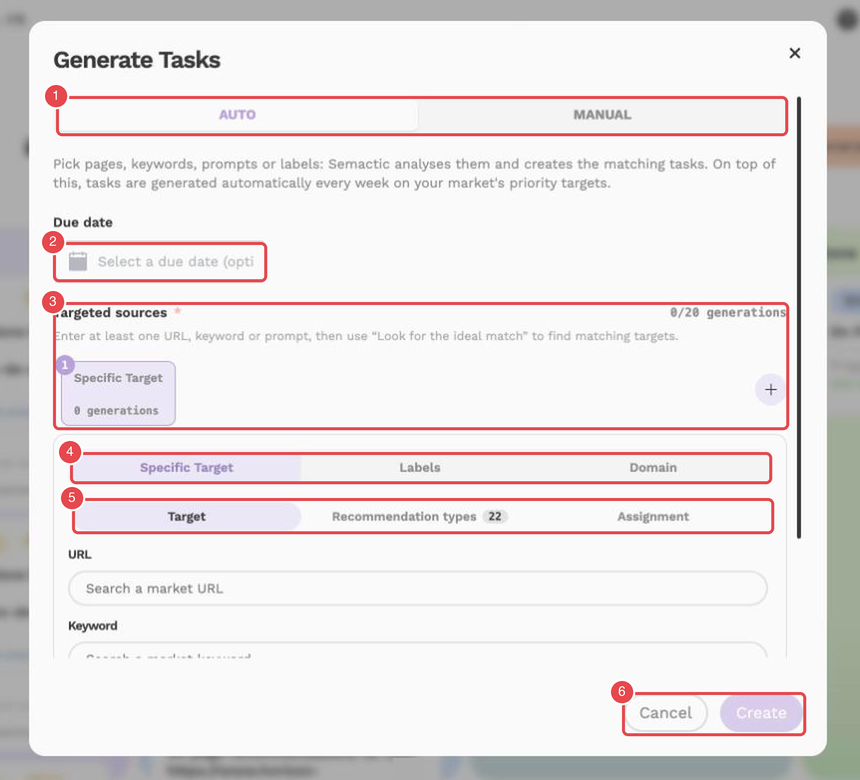
What the numbers show:
- Modes — AUTO and MANUAL.
- Due date — optional.
- Targeted sources — the targets you add, with the counter of generations (here 0/20 generations).
- Target type — Specific Target, Labels or Domain.
- Sub-tabs — Target, Recommendation types and Assignment.
- Cancel and Create — close the window, or launch the generation.
Choose SEO or GEO
Select whether the recommendations should be based on your Google keywords (SEO) or your AI prompts (GEO).
Choose the mode
- Auto — select labels, then the keywords (SEO) or prompts (GEO), then the URLs to work on; Semactic proposes the relevant recommendations.
- Manual — choose the recommendation types yourself and the keyword, prompt or URL they apply to; you can also set a due date and the user in charge.
Launch
Click Launch generation or Create Tasks. You are notified when the recommendations are available.
[!TIP] When a recommendation is not relevant, abandon the task rather than leaving it untouched: Semactic takes these choices into account to make the next recommendations more relevant.